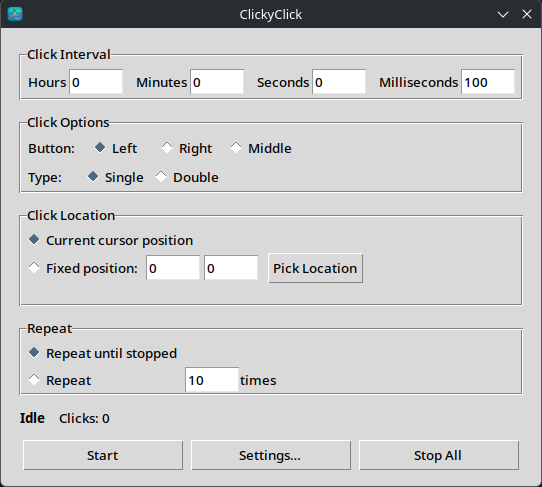
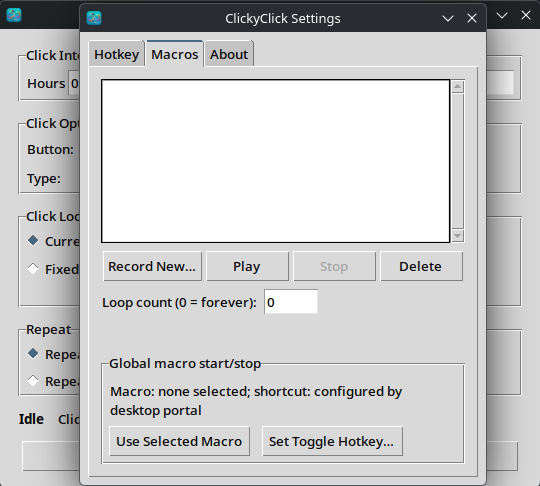
ClickyClick is a free and open-source automatic mouse clicker created specifically for Linux. It supports both X11 and Wayland and is designed to work across popular desktop environments, including KDE Plasma, GNOME, COSMIC, Cinnamon, Sway, and other compatible Linux desktops.
### Main features
- Automatic left, right, and middle mouse clicks
- Single-click and double-click modes
- Adjustable hours, minutes, seconds, and milliseconds
- Click at the current cursor position or selected coordinates
- Run continuously or for a chosen number of clicks
- Record and play mouse and keyboard macros
- Select your own global start/stop shortcuts
- Dedicated macro start/stop shortcut
- Always-visible Stop All button
- Emergency stop using Esc
- Native X11 support
- Wayland support through standard desktop portals
- No logout required
- Only one administrator confirmation for Wayland macro recording
- No administrator password required during normal use
## Version
Current version: **1.0**
## Supported Linux desktops
ClickyClick supports:
- KDE Plasma
- GNOME
- COSMIC
- Cinnamon
- Xfce and other X11 desktops
- Sway and compatible Wayland environments
- Other desktops that provide the standard RemoteDesktop and GlobalShortcuts portals
Exact Wayland functionality depends on the portal capabilities provided by the Linux desktop and compositor.
## Installation
First install the required system packages for your Linux distribution.
### Ubuntu, Debian, Linux Mint and Pop!_OS
sudo apt update
sudo apt install git python3 python3-venv python3-tk python3-gi xdg-desktop-portal
For KDE Plasma:
sudo apt install xdg-desktop-portal-kde
For GNOME:
sudo apt install xdg-desktop-portal-gnome
Fedora
sudo dnf install git python3 python3-pip python3-tkinter python3-gobject xdg-desktop-portal
For KDE Plasma:
sudo dnf install xdg-desktop-portal-kde
For GNOME:
sudo dnf install xdg-desktop-portal-gnome
Arch Linux and Manjaro
sudo pacman -S --needed git python python-pip tk python-gobject libei xdg-desktop-portal
Install the portal for your desktop:
sudo pacman -S --needed xdg-desktop-portal-kde
or:
sudo pacman -S --needed xdg-desktop-portal-gnome
Download and install ClickyClick
git clone https://github.com/dariuskazz/ClickyClick.git
cd ClickyClick./install.sh
The installer creates an isolated Python environment, installs the required Python packages, and adds ClickyClick to your application menu.
You can also start it directly:
./run.sh
First launch on Wayland
Your desktop may show a permission window the first time ClickyClick requests permission to control the pointer and keyboard. Approve this request to enable automatic clicking and macro playback.
When recording a macro for the first time, ClickyClick may request one administrator confirmation to configure input access. The change takes effect immediately:
- You do not need to log out.
- You do not need to restart the computer.
- The administrator confirmation is normally required only once.
- Normal use does not require administrator privileges.
X11 normally does not require this additional setup.
Safety controls
ClickyClick includes several ways to stop automatic actions:
- Press the configured global shortcut again.
- Press the macro toggle shortcut again.
- Use the Stop button.
- Use the always-visible Stop All button.
- Press Esc while the ClickyClick window is focused.
Download
Download the latest version from GitHub:
Source code:
Free and open source
ClickyClick is licensed under the GNU General Public License version 3. You may use, study, modify, and redistribute it under the terms of the GPL-3.0 license.
Copyright © 2026 Darius Kazlauskas.